Convert an EP-133 Project for the EP-40
- Pro
The EP-133 K.O. II and the EP-40 Riddim share most of their project format, but a project from one won’t simply load on the other. Rebuilding a song by hand means reassigning every pad and reprogramming every pattern. EP-PatchStudio’s project conversion does that for you: it makes an EP-40 copy of an EP-133 project in your Project Library, shows you what changes before it saves, then sends it to the EP-40.
Converting is part of Pro, and the 14-day trial includes it. It sits in the Project Library, and sending the converted project to your EP-40 is Pro too. The same steps work between any two of the EP-133, EP-40 and EP-1320.
What You’ll Need
Section titled “What You’ll Need”- EP-PatchStudio with Pro (or the trial)
- Your EP-133 and your EP-40, and a USB-C data cable
- A few spare minutes to back up both devices first
1. Back Up Both Devices
Section titled “1. Back Up Both Devices”Sending a project to the EP-40 replaces whatever is in the project slot you choose, and the project’s samples go into the same slot numbers they had on the EP-133, replacing any different sounds there. So take a backup of each device before you start. How to Back Up and Restore Your EP Device covers it.
2. Pull the Project into Your Library
Section titled “2. Pull the Project into Your Library”If the project is already in your Project Library, skip to step 3.
- Connect the EP-133 and open Project Library.
- Select Pull from Device.
- Choose the Project Slot, give it a Library Name and add any tags you like.
- Select Pull to Library.
Keep the EP-133 connected for the next step. The conversion can fetch any of the project’s sounds from it that aren’t already stored with the project.
3. Convert It
Section titled “3. Convert It”- In the Project Library, right-click the project’s row and choose Convert for Device….
- The Convert for Another Device window opens. Source Device fills in by itself when the project records where it came from. If it doesn’t, pick EP-133 K.O. II.
- Set Convert For to EP-40 Riddim.
The Conversion Preview then tells you what will happen: how many pads and patterns carry over (scenes always do) and how many bundled samples stay with the project. Any warnings are listed under it.
If some of the project’s sounds aren’t stored with it, you’ll see one of two things:
- With the EP-133 connected, a tick box to Fetch the (number) unbundled sounds from the connected K.O. II so they travel with the converted project. Leave it ticked.
- Without it, a note that those sounds must already be in the same slots on the EP-40, or their pads will be silent. Connect the EP-133 and open Convert for Device… again to fetch them.
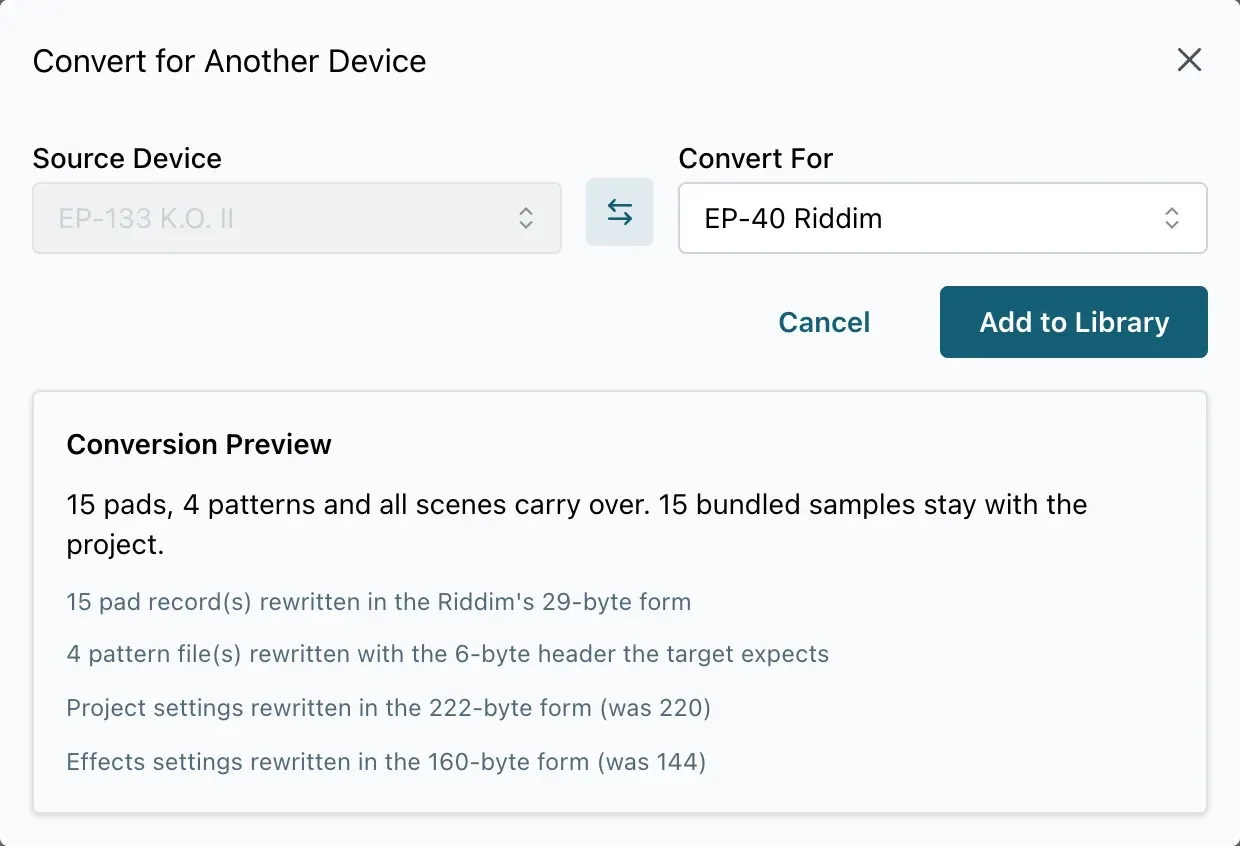
Then select Add to Library.
The converted copy is saved as a new project called “(project name) (Riddim)”, tagged converted. Your original project stays as it was.
4. Send It to the EP-40
Section titled “4. Send It to the EP-40”- Disconnect the EP-133 and connect the EP-40.
- Right-click the converted project’s row (or use the … button at the end of it) and choose Restore to Device.
- In Push Project to Device, pick the Target Slot (P01 to P09). The Overwrite Warning reminds you that the project in that slot will be replaced.
- Select Push to Device.
The app uploads the project’s samples first, then the project. If a slot already holds the same sound, it skips that upload. When it’s done, load the project on the EP-40 and play it through before you rely on it at a gig.
What Doesn’t Carry Across
Section titled “What Doesn’t Carry Across”From the EP-133 to the EP-40, almost everything comes over: every pad, every pattern and every scene. What to watch for:
- Samples. Bundled samples travel with the project, and the conversion can fetch the rest from a connected EP-133. Any sound that isn’t bundled or fetched has to be in the same slot on the EP-40 already, or that pad plays nothing.
- Settings from newer firmware. Some settings saved by newer firmware can’t be carried, and the preview warns you when that happens.
Going the other way, from the EP-40 to the EP-133 or EP-1320, a few more things change:
- Synth pads only exist on the EP-40, so they’re removed, and the preview lists them by name.
- BPM-synced loop pads become one-shot. The BPM time-stretch setting is kept.
- The master effect in slot 7 differs between devices. If the target has no equivalent, the effect is set to off. If it has a different effect there, your knob positions are kept but the effect changes.
- Keep the converted copy in your library alongside the original. It’s ready to send to the EP-40 again whenever you swap projects around.
- Swapping lots of projects between devices? Project Sets let you save and reload a whole device load at once.
Get Started
Section titled “Get Started”EP-PatchStudio is free to download. Project conversion is part of Pro, and the 14-day Pro trial includes it.
EP-PatchStudio is an independent app from SquareWave Studio. It is not affiliated with or endorsed by Teenage Engineering AB.