A Drum Synth for the Original OP-1
Gin
Twenty-four keys. Your own sounds. A little more life in the old machine.
Every sound is synthesised. Each key holds two versions, A and B, with a morph control that moves between them while you play.
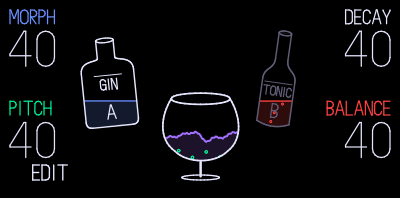
Demo
Gin on the Original OP-1
Playing it loads the video from YouTube.
Your Own Kits
From Tonic to Gin
Bring your own PO-32 transfer recording or Microtonic patch file. Conversion is free, with no account or payment required.
- Files
- Build Kit
- Download
Convert Your Own Kit
Gin has 24 sound slots. A PO-32 transfer contains up to 16 sounds. A Microtonic or Patternarium preset contains 8. Combine three eight-sound presets to fill all 24, or leave any slots empty.
Loading Converter…
PO-32 data-transfer WAV, Microtonic sound (.mtdrum) or kit (.mtpreset). A drum performance cannot be converted. Select one or several files, totalling up to 30 MB. WAV recordings: up to two minutes. Microtonic files: up to 1 MB each.
Find sounds at Patternarium or learn about Microtonic by Sonic Charge. Only drum sounds are converted, not sequencer patterns or effects.
Files are processed in your browser and are not uploaded.
Load the Kit on Your OP-1
For the original OP-1 with Gin already installed in compatible custom firmware.
- Connect the OP-1 to your computer with a USB data cable.
- On the OP-1, hold SHIFT and press COM (the album key), then pressT3 for DISK.
- Open the OP-1 drive in Finder or File Explorer. Open
drumand create a folder calledGINif it is not already there. - Copy the downloaded
.aifintoOP-1/drum/GIN/. Keep it out ofuserso it does not replace a working sound slot. - Safely eject the OP-1 drive, then leave Disk mode. Let the device finish updating its preset list.
- Press DRUM, then hold SHIFT and press a sound slot 1–8 to open the preset browser. Look for your kit in the GIN folder and load it.
The download is a preset, not a firmware update. Stock firmware and the OP-1 Field or OP-XY cannot load the Gin engine from this file.
Using Gin on Your OP-1
Gin needs compatible custom firmware on the original OP-1. Firmware maintainers provide their own packages and installation instructions. The source release does not include a firmware image or installable plugin.
Read the Compatibility NotesCredits and Thanks
Gin is by SquareWave Studio, based on Eric Lewis's libpo (MIT). If you enjoy Gin, please consider supporting Eric on GitHub Sponsors.
Thanks to Teenage Engineering for making the OP-1 and to Sonic Charge for the original Microtonic drum synth. Support their work by buying Microtonic.
Factory kits adapt CNTR RNDM's sounds. Thanks to Hundekraft, pcppcp and the op1r contributors for their integration and optimisation work.
Credits and LicencesGin is not affiliated with or endorsed by Teenage Engineering or Sonic Charge. All trademarks belong to their respective owners.