Back Up, Organise and Prep Samples for Your EP Devices
- EP-133 K.O. II
- EP-40 Riddim
- EP-1320 Medieval
One factory reset or lost project can cost you weeks. Back up every project on your EP, keep your sample slots in order and get new sounds ready to send in minutes.
- Mac
- Windows
- Linux
- iPhone
- iPad
- Android
Pro: pay once, pay what you want from $29. One licence works on up to 5 of your devices, desktop and mobile.
Now on iPhone and iPad: Stem SplitterBeta
Other PlatformsCompare Free and ProWatch the Demo
The Sample Editor is always free. Try every Pro tool free for 14 days. No sign-up, no card.
Trusted by EP owners in over 60 countries.
"Doing tiny edits on device is not easy, Ableton is annoying, the EP web tool is basic… this tool is like all three of those had a baby. I am glad I bought it already."
"Super easy to convert to lower sample rates. Saves space on the device and adds a bit of grit. 22k samples sound really good on the EP without being too dirty."
- Free to MakeThe editors never expire. No account, no ads.
- 14 Days of ProUnlocks when you install. No sign-up, no card.
- Pay Once, Keep ItA lifetime licence, with a 14-day money-back guarantee.
EP-PatchStudio on Your Phone and Tablet
Real screens from the app on iPhone, iPad and Android. The Auto-Sampler needs a computer.
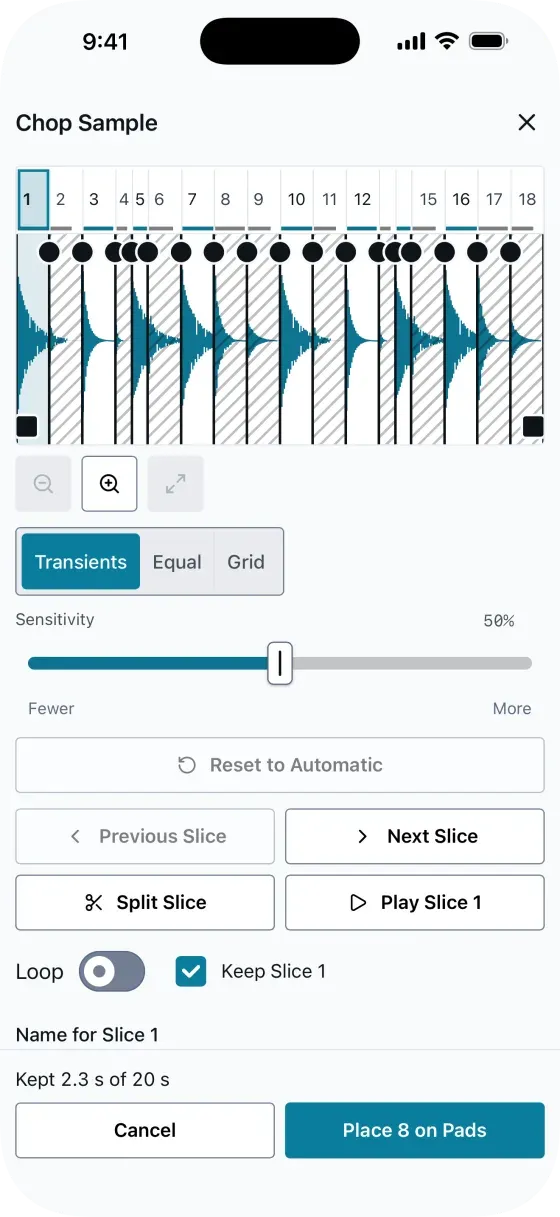
Chop Sample on iPhone (free). It finds the hits in a loop and shows every slice before it cuts.
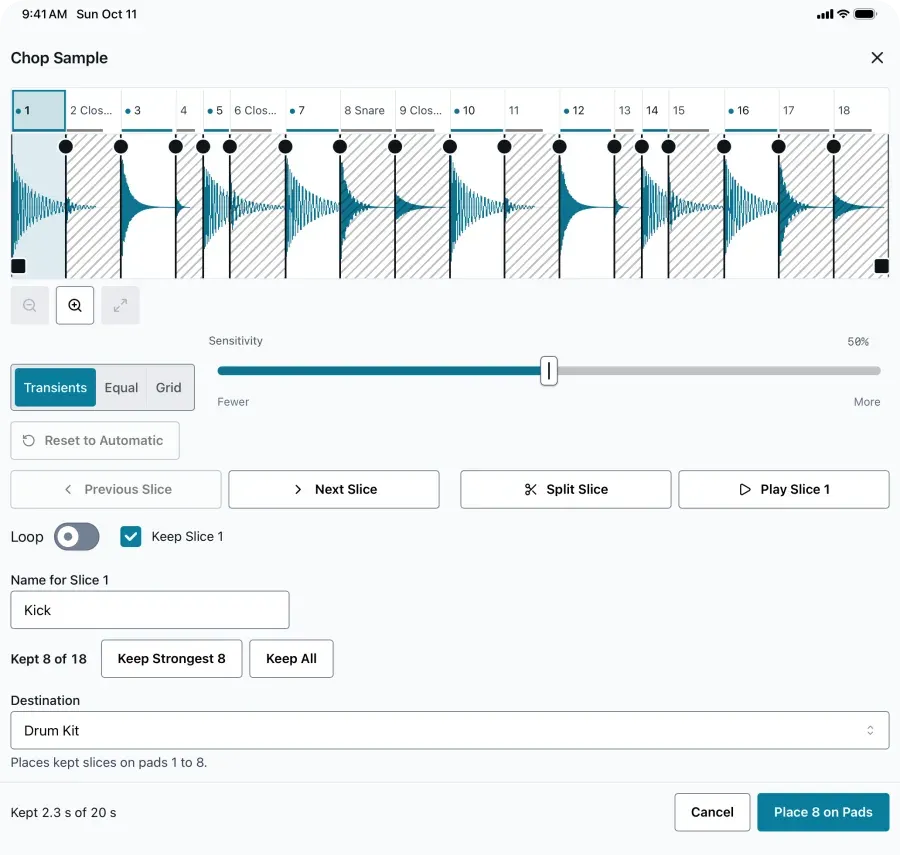
Chop Sample on iPad (free). Keep the strongest 8 slices, name them and put them on pads 1 to 8 as a Drum Kit.
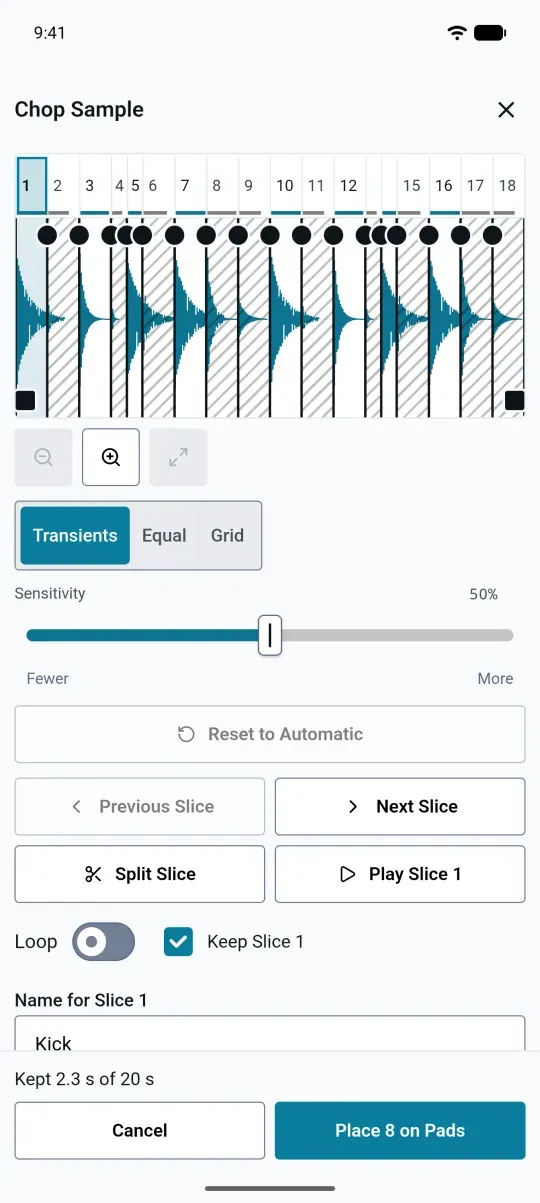
Chop Sample on Android (free). Drag Sensitivity for more or fewer slices, then play and name each one.
Back Up Projects Before You Change Things
One factory reset can wipe weeks of work. A full device backup takes about two minutes, and you can restore to the same EP or a different one.
Pro · Included in Your 14-Day TrialOne Project or the Whole Device
Back up a single project, all your projects or every sample slot on the device.
A File You Keep
Each backup is a file saved where you choose, samples included.
SmartRestore
Skips samples already on the device, so restores are quicker and write less.
Make Sounds Free. Pro Runs the Device.
Everything you make sounds with is free, with no time limit. Pro adds the device workflow, and you get all of it free for the first 14 days.
Free
$0always
- Sample Editor: trim, normalise, fade, reverse
- Time stretch, pitch shift, compressor, gate, limiter and EQ
- Chop Sample: slice a break onto pads or into WAVs
- EP-40 multisamples: all five playback modes, up to eight zones
- Device Info: storage, firmware and sample counts
- macOS, Windows, Linux, Android, iPhone and iPad, with lifetime updates
Pro
From $29once
- Everything in Free
- Send to device in one click, and batch operations
- Browse, upload, download and delete files on the device
- Full device and per-project backup and restore
- Batch Processor: many files in one pass
- Stem Splitter: private, offline stem separation on computers, and on phones and tablets with about 6 GB of memory Beta
- Project Library, Project Sets, Sample Packs and Insights
- Timeline editor and MIDI export
- Auto-Sampler for hardware synths and VSTs (Mac, Windows and Linux only)
- Priority email support
Every Feature, Row by Row
| Feature | Free | Pro |
|---|---|---|
| Sample editing | ||
| Waveform view | ||
| Trim, normalise, fade, reverse | ||
| Time stretch and pitch shift | ||
| Compressor, gate, limiter, EQ | ||
| Chop Sample: slice by hits, into equal parts or to a tempo grid | ||
| Batch Processor (many files in one pass) | ||
| Stem Splitter (Beta): private, offline stem separation on computers, and on phones and tablets with about 6 GB of memory | ||
| Multisample creation | ||
| Create multisamples (manual zones) | ||
| All five playback modes | ||
| Up to eight zones | ||
| Auto zone mapping from metadata and filenames | ||
| Device management | ||
| Device Info: storage, firmware and sample counts | ||
| Browse device file system | ||
| Upload, download and delete files | ||
| Send to device (one click) | ||
| Batch operations | ||
| Backup and restore | ||
| Full device backup | ||
| Per-project backup and restore | ||
| Project management | ||
| Browse device projects | ||
| Inspect project contents | ||
| Project library (unlimited local storage) | ||
| Project Sets: load up to nine projects in one go | ||
| Sample Packs: tagged sample bundles to zip or send | ||
| Insights and an annual Wrapped from your library | ||
| Timeline editor | ||
| MIDI export | ||
| Auto-Sampler (Mac, Windows and Linux only) | ||
| MIDI auto-sampler | ||
| Record from hardware synths and VSTs | ||
| Platform and support | ||
| macOS, Windows, Linux | ||
| Android, iPhone and iPad | ||
| Lifetime updates | ||
| Priority email support | ||
Pay What You Want, Once
Every tier gets the same Pro tools. Pick what feels fair for you, from $29. No subscription.
EP-PatchStudio Pro
Lifetime LicenceSupport EP-PatchStudio Development
Pay what it's worth to you. Every purchase keeps this project alive.
✓ All of Pro, plus a bit more towards what I build next. Thank you.
Enter a creator's code or a discount code. Any discount comes off at checkout.
Pay once. Your Pro licence is yours to keep, with lifetime updates. No subscription, no expiring licences, no recurring charges.
14-day money-back guarantee.
Secure checkout powered by LemonSqueezy & Stripe
What You Get
- Every Pro tool, whatever you pay
- One licence for up to 5 devices, desktop and mobile
- Lifetime updates, no subscription
- Works offline after the first activation
- 14-day money-back guarantee
"I actually bought it even though Joe kindly offered me a free licence for helping test it. I decided it was worth the money as I'll definitely be using it."
Later, after the OP launch: EP + OP, Pro for EP-PatchStudio and OP-PatchStudio in one order. Not on sale yet. Get Notified
 Download EP-PatchStudio
Free on every platform. The Sample Editor, multisamples and drum kits are always free, and every Pro tool is yours to try for 14 days.
- Direct DownloadmacOSmacOS 11.0 or later, Intel and Apple SiliconDownload
- Direct DownloadWindowsWindows 10 or later, 64-bit installerDownload
- AppImageLinuxAny distroDownload
- APKAndroidAndroid 7.0+, allow install from unknown sourcesDownload

Need an earlier desktop build? See Older Versions.
Before You Buy
What's Free?
The Sample Editor, multisamples for the EP-40 and drum kits, always. Pro adds device management, backup and restore, the Auto-Sampler and the Batch Processor. Try every Pro tool free for 14 days. No sign-up, no card.
Is this a subscription?
No. The core tools are always free. Pro is a one-off licence: pay what you want from $29, once, with lifetime updates.
What's the difference between this and TE's EP Sample Tool?
TE's EP Sample Tool runs in the browser. EP-PatchStudio is a native app that works offline. The Sample Editor, multisamples for the EP-40 and drum kits are always free. Pro adds the device workflow: one-click backups, batch transfers, the Auto-Sampler and the Batch Processor.
What if I don't like it?
There is a 14-day money-back guarantee. See the refund policy for the details.
Does it work with my device?
EP-PatchStudio supports the EP-40 Riddim, EP-133 K.O. II and EP-1320 Medieval. It builds multisamples for the EP-40, and looped samples are EP-40 only. The EP-133 doesn't play multisamples. Device management works with all three.
Why pay what you want?
I'd rather you use the software than skip it because of price.
Traditional pricing forces everyone into the same box. Pay-what-you-want lets you pay what feels fair for your situation. Everyone gets the same software with every Pro feature, whatever they pay. You own it forever.
The price difference is about supporting development, not unlocking capabilities.
Mac, Windows, Linux… phones?
Yes, nearly all of it. A licence bought here works on up to five devices: Mac, Windows and Linux, plus the iPhone, iPad and Android apps. Enter the key in Settings > Licence on each one. The one exception is the Auto-Sampler, which needs a computer. On iPhone and iPad you can also buy Pro in the app. It unlocks on your other devices signed in to the same Apple account: tap Restore purchases in the Licence tab. Want Pro on your computer too? Email support@squarewave.studio with your App Store order ID and I'll send you a desktop licence at no extra cost.
Connects over USB. On a USB-C iPhone or iPad, a USB-C data cable is all you need (charge-only cables won't work). On a Lightning iPhone or iPad, use Apple's Lightning to USB 3 Camera Adapter with its power socket plugged in, and a USB-A to USB-C data cable from the adapter to your EP. It works, but Lightning connections can drop now and then, which the app can't fix, so check it connects in Device Info first, which is free.
What if I need help?
Free users can get help via the Discord community. Pro users get email support, and I typically respond within 24 hours, often faster. It's just me, so you're talking to the person who actually built the thing.
Can I export my work?
Yes. Samples, multisamples and drum kits export as files you keep, for free. Backups need Pro (Backup & Restore). Your work is yours. Nothing is locked into the app.
Is there annoying DRM or copy protection?
No. Payments and licensing run through LemonSqueezy. You get a licence key by email when you purchase. Enter it once to activate and you're done. It does a quick online check on first activation, and after that the app works completely offline.
Still stuck? Join the Discord community or read the documentation.
Back Up Your EP Today
Download it, plug in your EP and try every Pro tool for 14 days. If it earns its place, pay once and keep it.